dbhpaloc: Quickly Validate HugePages Allocation Across Every Oracle Database on a Server

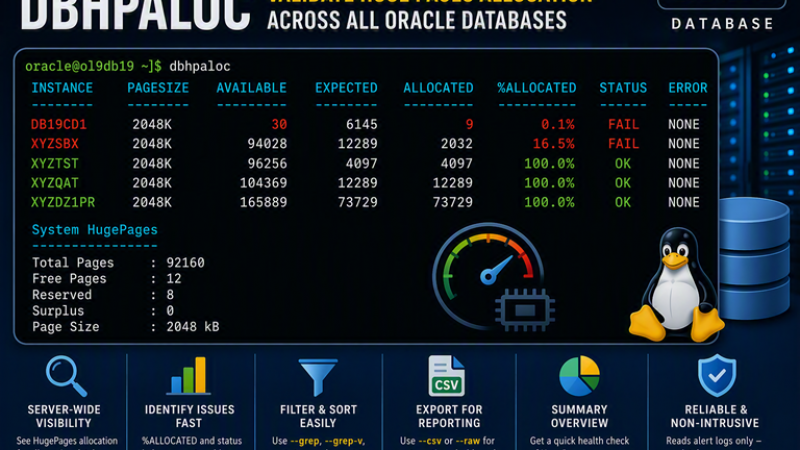
As Oracle DBAs, you spend a significant amount of time planning memory configurations, sizing SGAs, and ensuring databases are making efficient use of system resources. One configuration that is often treated as “set it and forget it” is HugePages.
HugePages play an important role in Oracle performance by reducing page table overhead and improving memory management efficiency. Most DBAs know how to verify HugePages at the operating system level, but far fewer regularly verify whether each database actually received the HugePages allocation it requested during startup.
That’s where dbhpaloc comes in.
The Problem
Checking HugePages at the operating system level is easy:
grep Huge /proc/meminfo
Example:
HugePages_Total: 92160
HugePages_Free:     21
HugePages_Rsvd:      8
HugePages_Surp:      0
Hugepagesize:     2048 kB
While useful, this does not answer a DBA’s most important question: Did Oracle actually allocate the HugePages it expected during startup?
When an instance starts, Oracle records the result in the alert log:
PAGESIZE  AVAILABLE_PAGES  EXPECTED_PAGES  ALLOCATED_PAGES  ERROR(s)

2048K            96256            4097             4097        NONE
This tells us:
- How many HugePages were available.
- How many HugePages Oracle expected.
- How many HugePages Oracle actually received.
- Whether any allocation errors occurred.
The problem is that manually checking alert logs across multiple databases quickly becomes tedious.
Introducing dphpaloc
dbhpaloc automatically discovers all running Oracle databases on a server and extracts HugePages allocation information from each database’s alert log.
Instead of opening several alert logs and searching manually, a DBA can run dbhpaloc and immediately see a consolidated report:
[oracle@ol9db19 ~]$ dbhpaloc

INSTANCE     PAGESIZE      AVAILABLE     EXPECTED    ALLOCATED   %ALLOCATED STATUS   ERROR
--------     --------      ---------     --------    ---------   ---------- ------   -----
DB19CD1      2048K                30         6145            9         0.1% FAIL     NONE
XYZSBX       2048K             94028        12289         2032        16.5% FAIL     NONE
XYZTST       2048K             96256         4097         4097       100.0% OK       NONE
XYZQAT       2048K            104369        12289        12289       100.0% OK       NONE
XYZDZ1PR     2048K            165889        73729        73729       100.0% OK       NONE

System HugePages
----------------
Total Pages : 92160
Free Pages  : 12
Reserved    : 8
Surplus     : 0
Page Size   : 2048 kB
In a single command, it’s immediately obvious which databases require further investigation.
Key Benefits of dbhpaloc
1. Server-Wide Visibility
Instead of checking each database individually, dbhpaloc automatically discovers all running Oracle instances and provides a consolidated view of HugePages allocation across the entire server.
Benefit:
- Saves time on multi-database hosts.
- Provides a single source of truth.
- Makes environment-wide validation easy.
2. Verifies Actual HugePages Allocation
Checking /proc/meminfo only tells you how HugePages are configured at the OS level.
dbhpaloc shows:
- Available HugePages
- Expected HugePages
- Allocated HugePages
- Allocation percentage
- Allocation status
Benefit:
- Confirms what Oracle actually received during startup.
- Identifies partial or failed allocations that would otherwise go unnoticed.
3. Quickly Highlights Problem Databases
The %ALLOCATED column and status calculation make problem databases immediately obvious.
Example:
INSTANCE     PAGESIZE      AVAILABLE     EXPECTED    ALLOCATED   %ALLOCATED STATUS   ERROR
--------     --------      ---------     --------    ---------   ---------- ------   -----
DB19CD1      2048K                30         6145            9         0.1% FAIL     NONE
XYZSBX 2048K 94028 12289 2032 16.5% FAIL NONEBenefit:
- Focuses DBA attention on the databases that need investigation.
- Eliminates manual comparison of large numeric values.
4. Sortable Results
Built-in sorting allows DBAs to organize the report based on what’s most important.
Examples:
dbhpaloc --sort %allocated
dbhpaloc --sort expected:desc
dbhpaloc --sort instanceBenefit:
- Surfaces the worst allocation issues first.
- Helps identify the largest SGAs and memory consumers.
5. Powerful Filtering
Built-in filtering allows you to reduce noise and focus on specific databases.
Examples:
dbhpaloc --status fail
dbhpaloc --grep mxgd
dbhpaloc --grep-v awmBenefit:
- Quickly isolate affected databases.
- Useful on servers hosting many environments.
6. Built-In Health Reporting
The --summary option provides an executive-level overview.
Example:
Databases Checked : 5
OK                : 3
FAIL              : 2
ERROR             : 0
Average Allocation: 63.3%
Benefit:
- Great for health checks.
- Useful for post-maintenance validation.
- Allows quick assessment without reviewing every row.
7. CSV Export Capability
Export results directly for reporting and analysis.
dbhpaloc --csvBenefit:
- Easy integration with Excel.
- Supports reporting and trend analysis.
- Useful for management reviews and audit documentation.
Automation-Friendly Output
The –raw format is designed for scripting and pipelines.
Example:
[oracle@ol9db19 ~]$ dbhpaloc --raw
DB19CD1,2048K,30,6145,9,0.1%,FAIL,NONE
XYZSBX,2048K,94028,12289,2032,16.5%,FAIL,NONE
XYZTST,2048K,96256,4097,4097,100.0%,OK,NONE
XYZQAT,2048K,104369,12289,12289,100.0%,OK,NONE
XYZDZ1PR,2048K,165889,73729,73729,100.0%,OK,NONE
Benefit:
- Easy integration with:
- Shell scripts
- Ansible
- Monitoring tools
- Scheduled jobs
- Health-check frameworks
9. Handles Real-World Oracle Environments
During development, the function was enhanced to handle:
- Multiple Oracle Homes
- Multiple databases per server
- Databases with similar names
- Multiple matching alert logs
- Timestamped alert log formats
- Different diagnostic structures
- PMON discovery edge cases
Benefit:
- Production-ready.
- More reliable than a simple proof-of-concept script.
10. Ideal for Post-Maintenance Validation
One of the most practical uses is immediately after:
- Server reboots
- Oracle patching
- Kernel updates
- HugePages changes
- Data Guard role transitions
- Infrastructure refreshes
Benefit:
- Quickly validates memory configuration across all databases.
- Helps detect issues before users notice performance problems.
Current version of dbhpaloc function
Here is the current version of dbhpaloc function. Please test it out and let me know if you encounter any issues.
function dbhpaloc() {
local SORT_BY="%allocated"
local SORT_DIR="asc"
local GREP_PATTERN=""
local GREP_V_PATTERN=""
local STATUS_FILTER=""
local CSV_MODE="N"
local RAW_MODE="N"
local SUMMARY_MODE="N"
local TMP_FILE
local FILTERED_FILE
local SORTED_FILE
local PID
local SID
local ORACLE_HOME
local ORACLE_BASE
local ALERT_FILE
local HP_ROW
local PAGESIZE
local AVAILABLE
local EXPECTED
local ALLOCATED
local ERRORS
local STATUS
local PCT_ALLOCATED
local c1 c2 c3 c4 c5 c6 c7 c8
while [[ $# -gt 0 ]]
do
case "$1" in
--sort)
if [ -z "$2" ]
then
echo "ERROR: --sort requires a value"
echo "Try: dbhpaloc --help"
return 1
fi
SORT_BY=$(echo "$2" | tr '[:upper:]' '[:lower:]')
shift 2
;;
--sort=*)
SORT_BY=$(echo "${1#*=}" | tr '[:upper:]' '[:lower:]')
shift
;;
--grep)
if [ -z "$2" ]
then
echo "ERROR: --grep requires a pattern"
echo "Try: dbhpaloc --help"
return 1
fi
GREP_PATTERN="$2"
shift 2
;;
--grep=*)
GREP_PATTERN="${1#*=}"
shift
;;
--grep-v)
if [ -z "$2" ]
then
echo "ERROR: --grep-v requires a pattern"
echo "Try: dbhpaloc --help"
return 1
fi
GREP_V_PATTERN="$2"
shift 2
;;
--grep-v=*)
GREP_V_PATTERN="${1#*=}"
shift
;;
--status)
if [ -z "$2" ]
then
echo "ERROR: --status requires one of: ok, fail, error"
echo "Try: dbhpaloc --help"
return 1
fi
STATUS_FILTER=$(echo "$2" | tr '[:upper:]' '[:lower:]')
shift 2
;;
--status=*)
STATUS_FILTER=$(echo "${1#*=}" | tr '[:upper:]' '[:lower:]')
shift
;;
--csv)
CSV_MODE="Y"
shift
;;
--raw)
RAW_MODE="Y"
shift
;;
--summary)
SUMMARY_MODE="Y"
shift
;;
-h|--help)
cat <<EOF
Usage:
dbhpaloc
Filtering:
dbhpaloc --grep <pattern>
dbhpaloc --grep-v <pattern>
dbhpaloc --status ok
dbhpaloc --status fail
dbhpaloc --status error
Sorting:
dbhpaloc --sort instance
dbhpaloc --sort instance:desc
dbhpaloc --sort db
dbhpaloc --sort %allocated
dbhpaloc --sort %allocated:desc
dbhpaloc --sort expected
dbhpaloc --sort expected:desc
dbhpaloc --sort allocated
dbhpaloc --sort allocated:desc
dbhpaloc --sort status
Output:
dbhpaloc --summary
dbhpaloc --csv
dbhpaloc --raw
Description:
Displays HugePages allocation information for all running Oracle
databases based on the latest HugePages allocation section found
in each database alert log.
Filter Options:
--grep <pattern> Include only DB instances matching pattern
--grep-v <pattern> Exclude DB instances matching pattern
--status <status> Filter by status: ok, fail, error
Sort Columns:
instance Database / instance name
db Alias for instance
dbname Alias for instance
database Alias for instance
%allocated HugePages allocation percentage, default
pct Alias for %allocated
expected Expected HugePages
allocated Allocated HugePages
status OK / FAIL / ERROR
Sort Direction:
Append :desc to sort descending.
Output Options:
--summary Show summary after the table
--csv Output first table only as CSV, including header
--raw Output first table only as CSV rows, excluding header
Examples:
dbhpaloc
dbhpaloc --status fail
dbhpaloc --grep awm
dbhpaloc --grep-v awm
dbhpaloc --grep mxgd --status fail
dbhpaloc --sort %allocated
dbhpaloc --sort %allocated:desc
dbhpaloc --sort allocated:desc
dbhpaloc --status fail --csv
dbhpaloc --status fail --raw
dbhpaloc --summary
EOF
return 0
;;
*)
echo "ERROR: Unknown option: $1"
echo "Try: dbhpaloc --help"
return 1
;;
esac
done
if [[ "$SORT_BY" == *:* ]]
then
SORT_DIR="${SORT_BY#*:}"
SORT_BY="${SORT_BY%%:*}"
fi
case "$SORT_DIR" in
asc|desc)
;;
*)
echo "ERROR: Invalid sort direction: $SORT_DIR"
echo "Valid directions are: asc, desc"
return 1
;;
esac
case "$STATUS_FILTER" in
""|ok|fail|error)
;;
*)
echo "ERROR: Invalid status filter: $STATUS_FILTER"
echo "Valid status values are: ok, fail, error"
return 1
;;
esac
if [ "$CSV_MODE" = "Y" ] && [ "$RAW_MODE" = "Y" ]
then
echo "ERROR: --csv and --raw cannot be used together"
return 1
fi
TMP_FILE=$(mktemp /tmp/dbhpaloc.XXXXXX) || return 1
FILTERED_FILE=$(mktemp /tmp/dbhpaloc.filtered.XXXXXX) || {
rm -f "$TMP_FILE"
return 1
}
SORTED_FILE=$(mktemp /tmp/dbhpaloc.sorted.XXXXXX) || {
rm -f "$TMP_FILE" "$FILTERED_FILE"
return 1
}
##########################################################################
# Collect rows
##########################################################################
ps -eo pid,args |
awk '
/[o]ra_pmon_/ {
pid=$1
sid=$0
sub(/^.*ora_pmon_/, "", sid)
sub(/[[:space:]].*$/, "", sid)
print pid "|" sid
}
' |
sort -t'|' -k2,2 |
while IFS='|' read -r PID SID
do
[ -z "$SID" ] && continue
######################################################################
# Find ORACLE_HOME
# Preferred: running PMON environment.
# Fallback : /etc/oratab.
######################################################################
# ORACLE_HOME=$(
# tr '\0' '\n' < "/proc/${PID}/environ" 2>/dev/null |
# awk -F= '$1 == "ORACLE_HOME" {print $2; exit}'
# )
#
# if [ -z "$ORACLE_HOME" ]
# then
# ORACLE_HOME=$(
# awk -F: -v sid="$SID" '
# $1 == sid {
# print $2
# exit
# }
# ' /etc/oratab 2>/dev/null
# )
# fi
ORACLE_HOME=$(
awk -F: -v sid="$SID" '
$1 == sid {
print $2
exit
}
' /etc/oratab 2>/dev/null
)
[[ "$SID" =~ ^[A-Za-z0-9_]+$ ]] || continue
if [ -z "$ORACLE_HOME" ] || [ ! -d "$ORACLE_HOME" ]
then
echo "${SID}|-|-|-|-|0.0|ERROR|ORACLE_HOME not found" >> "$TMP_FILE"
continue
fi
######################################################################
# Find ORACLE_BASE
######################################################################
ORACLE_BASE=$(
ORACLE_HOME="$ORACLE_HOME" \
ORACLE_SID="$SID" \
"$ORACLE_HOME/bin/orabase" 2>/dev/null
)
if [ -z "$ORACLE_BASE" ]
then
ORACLE_BASE=$(dirname "$(dirname "$ORACLE_HOME")")
fi
if [ -z "$ORACLE_BASE" ] || [ ! -d "$ORACLE_BASE" ]
then
echo "${SID}|-|-|-|-|0.0|ERROR|ORACLE_BASE not found" >> "$TMP_FILE"
continue
fi
######################################################################
# Find newest matching alert log for this SID.
######################################################################
ALERT_FILE=$(
find "$ORACLE_BASE/diag/rdbms" \
-type f \
-name "alert_${SID}.log" \
-printf '%T@|%p\n' \
2>/dev/null |
sort -t'|' -k1,1nr |
head -1 |
cut -d'|' -f2-
)
if [ -z "$ALERT_FILE" ] || [ ! -f "$ALERT_FILE" ]
then
echo "${SID}|-|-|-|-|0.0|ERROR|Alert log not found" >> "$TMP_FILE"
continue
fi
######################################################################
# Extract latest 2048K HugePages row.
#
# Oracle alert logs may include timestamp lines between the header
# and the actual HugePages rows.
######################################################################
HP_ROW=$(
awk '
/PAGESIZE[[:space:]]+AVAILABLE_PAGES[[:space:]]+EXPECTED_PAGES[[:space:]]+ALLOCATED_PAGES/ {
in_hp_section=1
next
}
in_hp_section && /^[[:space:]]*2048K[[:space:]]+/ {
row=$0
in_hp_section=0
next
}
in_hp_section && /^[[:space:]]*\*+/ {
in_hp_section=0
next
}
END {
gsub(/^[[:space:]]+/, "", row)
gsub(/[[:space:]]+$/, "", row)
print row
}
' "$ALERT_FILE"
)
if [ -z "$HP_ROW" ]
then
echo "${SID}|-|-|-|-|0.0|ERROR|2048K entry not found" >> "$TMP_FILE"
continue
fi
PAGESIZE=$(echo "$HP_ROW" | awk '{print $1}')
AVAILABLE=$(echo "$HP_ROW" | awk '{print $2}')
EXPECTED=$(echo "$HP_ROW" | awk '{print $3}')
ALLOCATED=$(echo "$HP_ROW" | awk '{print $4}')
ERRORS=$(echo "$HP_ROW" | awk '{print $5}')
[ -z "$ERRORS" ] && ERRORS="-"
######################################################################
# Calculate allocation percentage.
# Keep numeric internally for sorting.
######################################################################
if [[ "$EXPECTED" =~ ^[0-9]+$ ]] &&
[[ "$ALLOCATED" =~ ^[0-9]+$ ]] &&
[ "$EXPECTED" -gt 0 ]
then
PCT_ALLOCATED=$(
awk "BEGIN { printf \"%.1f\", ($ALLOCATED / $EXPECTED) * 100 }"
)
else
PCT_ALLOCATED="0.0"
fi
if [ "$EXPECTED" = "$ALLOCATED" ] &&
[ "$ERRORS" = "NONE" ]
then
STATUS="OK"
else
STATUS="FAIL"
fi
echo "${SID}|${PAGESIZE}|${AVAILABLE}|${EXPECTED}|${ALLOCATED}|${PCT_ALLOCATED}|${STATUS}|${ERRORS}" >> "$TMP_FILE"
done
##########################################################################
# Apply filters
#
# Filter order:
# 1. --grep
# 2. --grep-v
# 3. --status
##########################################################################
awk -F'|' \
-v grep_pattern="$GREP_PATTERN" \
-v grep_v_pattern="$GREP_V_PATTERN" \
-v status_filter="$STATUS_FILTER" '
BEGIN {
IGNORECASE=1
}
{
show=1
if (grep_pattern != "" && $1 !~ grep_pattern) {
show=0
}
if (grep_v_pattern != "" && $1 ~ grep_v_pattern) {
show=0
}
if (status_filter != "" && tolower($7) != status_filter) {
show=0
}
if (show == 1) {
print
}
}
' "$TMP_FILE" > "$FILTERED_FILE"
##########################################################################
# Sort
##########################################################################
case "$SORT_BY" in
instance|db|dbname|database)
if [ "$SORT_DIR" = "desc" ]
then
sort -t'|' -r -k1,1 "$FILTERED_FILE" > "$SORTED_FILE"
else
sort -t'|' -k1,1 "$FILTERED_FILE" > "$SORTED_FILE"
fi
;;
%allocated|allocated_pct|pct|pct_allocated|percent|percentage)
if [ "$SORT_DIR" = "desc" ]
then
sort -t'|' -k6,6nr "$FILTERED_FILE" > "$SORTED_FILE"
else
sort -t'|' -k6,6n "$FILTERED_FILE" > "$SORTED_FILE"
fi
;;
expected)
if [ "$SORT_DIR" = "desc" ]
then
sort -t'|' -k4,4nr "$FILTERED_FILE" > "$SORTED_FILE"
else
sort -t'|' -k4,4n "$FILTERED_FILE" > "$SORTED_FILE"
fi
;;
allocated)
if [ "$SORT_DIR" = "desc" ]
then
sort -t'|' -k5,5nr "$FILTERED_FILE" > "$SORTED_FILE"
else
sort -t'|' -k5,5n "$FILTERED_FILE" > "$SORTED_FILE"
fi
;;
status)
if [ "$SORT_DIR" = "desc" ]
then
sort -t'|' -r -k7,7 "$FILTERED_FILE" > "$SORTED_FILE"
else
sort -t'|' -k7,7 "$FILTERED_FILE" > "$SORTED_FILE"
fi
;;
*)
echo "ERROR: Invalid sort column: $SORT_BY"
echo "Valid sort columns: instance, db, %allocated, expected, allocated, status"
rm -f "$TMP_FILE" "$FILTERED_FILE" "$SORTED_FILE"
return 1
;;
esac
##########################################################################
# CSV / RAW output
#
# --csv and --raw output only the first table.
# They intentionally skip System HugePages and Summary sections.
##########################################################################
if [ "$CSV_MODE" = "Y" ]
then
echo "INSTANCE,PAGESIZE,AVAILABLE,EXPECTED,ALLOCATED,%ALLOCATED,STATUS,ERROR"
while IFS='|' read -r c1 c2 c3 c4 c5 c6 c7 c8
do
printf "%s,%s,%s,%s,%s,%s%%,%s,%s\n" \
"$c1" "$c2" "$c3" "$c4" "$c5" "$c6" "$c7" "$c8"
done < "$SORTED_FILE"
rm -f "$TMP_FILE" "$FILTERED_FILE" "$SORTED_FILE"
return 0
fi
if [ "$RAW_MODE" = "Y" ]
then
while IFS='|' read -r c1 c2 c3 c4 c5 c6 c7 c8
do
printf "%s,%s,%s,%s,%s,%s%%,%s,%s\n" \
"$c1" "$c2" "$c3" "$c4" "$c5" "$c6" "$c7" "$c8"
done < "$SORTED_FILE"
rm -f "$TMP_FILE" "$FILTERED_FILE" "$SORTED_FILE"
return 0
fi
##########################################################################
# Display formatted table
##########################################################################
echo
printf "%-12s %-10s %12s %12s %12s %12s %-8s %s\n" \
"INSTANCE" "PAGESIZE" "AVAILABLE" "EXPECTED" "ALLOCATED" "%ALLOCATED" "STATUS" "ERROR"
printf "%-12s %-10s %12s %12s %12s %12s %-8s %s\n" \
"--------" "--------" "---------" "--------" "---------" "----------" "------" "-----"
while IFS='|' read -r c1 c2 c3 c4 c5 c6 c7 c8
do
printf "%-12s %-10s %12s %12s %12s %12s %-8s %s\n" \
"$c1" "$c2" "$c3" "$c4" "$c5" "${c6}%" "$c7" "$c8"
done < "$SORTED_FILE"
##########################################################################
# Summary
##########################################################################
if [ "$SUMMARY_MODE" = "Y" ]
then
echo
echo "Summary"
echo "-------"
awk -F'|' '
BEGIN {
total=0
ok=0
fail=0
error=0
pct_sum=0
}
{
total++
pct_sum += $6
if ($7 == "OK") {
ok++
}
else if ($7 == "FAIL") {
fail++
}
else if ($7 == "ERROR") {
error++
}
}
END {
if (total > 0) {
avg = pct_sum / total
}
else {
avg = 0
}
printf "Databases Checked : %d\n", total
printf "OK : %d\n", ok
printf "FAIL : %d\n", fail
printf "ERROR : %d\n", error
printf "Average Allocation : %.1f%%\n", avg
}
' "$SORTED_FILE"
fi
##########################################################################
# System HugePages
##########################################################################
echo
echo "System HugePages"
echo "----------------"
awk '
/HugePages_Total/ {total=$2}
/HugePages_Free/ {free=$2}
/HugePages_Rsvd/ {rsvd=$2}
/HugePages_Surp/ {surp=$2}
/Hugepagesize/ {size=$2 " " $3}
END {
printf "Total Pages : %s\n", total
printf "Free Pages : %s\n", free
printf "Reserved : %s\n", rsvd
printf "Surplus : %s\n", surp
printf "Page Size : %s\n", size
}
' /proc/meminfo
echo
rm -f "$TMP_FILE" "$FILTERED_FILE" "$SORTED_FILE"
}